Switch to in seconds.
Octet changes IPv4 and DNS on Windows and macOS in one click, then shows you who else is on the network. A fast, modern take on Simple IP Config, written in Rust.
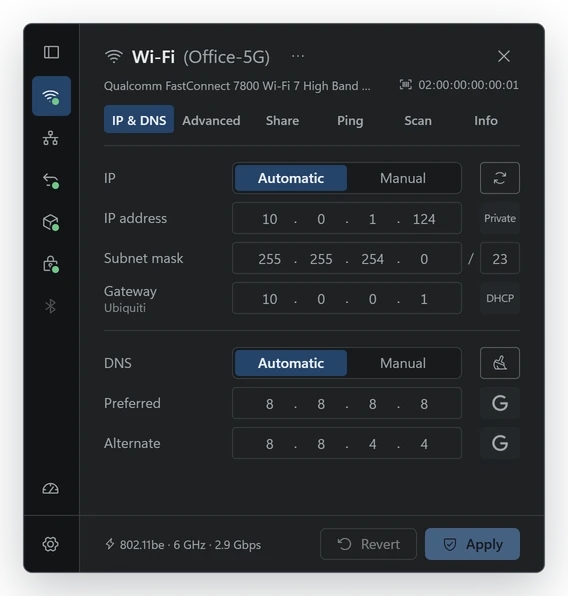
DHCP or manual in one click.
Every field is checked as you type. Before Apply, Octet asks the network whether someone already has the address. After, it pings the gateway and DNS for you.
Keys 1–7 switch. In the app: Ctrl+1–6, or ⌘1–6 on a Mac
Paste
One line in, a whole setup out.
Try it. This is the parser from the app: an address with /prefix or a mask, then gw and dns.
Paste this anywhere in Octet and the form fills in.
Engine
Fast, all the way down.
Rust talking to the system directly. A DNS change takes milliseconds.
ipconfigPowerShellflashing consoles
IP HelperWindows: addresses, DNS and DHCP, straight from the system.
networksetupmacOS: changes made the way System Settings makes them.
Pinned socketsPing, Scan and the speed test leave by the adapter on screen, no other.
Follows the system
Cable, Wi-Fi and address changes show up on their own.
The usual buttons
Release and renew, flush DNS, enable and disable adapters.
DNS presets
Google, Cloudflare, Quad9, AdGuard, OpenDNS and NextDNS, named as you type them.
One line, whole setup
Copy a configuration as text, paste it on another computer.
Keyboard first
Ctrl+1 to Ctrl+6 switch tabs, ⌘1 to ⌘6 on a Mac.
Updates inside
Check, download and restart from Settings. Every release is signed.
Privacy
Private by default.
No account, no telemetry, no server of its own.
 This computer
Sends only what you'd expect
An ARP check before Apply, pings to the gateway and DNS after it, pings and ARP while you Ping or Scan, a TCP connect when you ping a port or check a device's ports, and a reverse lookup for the gateway.
MAC addresses stay home
Device makers come from the IEEE list built into the app. MACs are never looked up online.
The internet only when you ask
Your public IP and the speed test through Cloudflare, and updates from GitHub. Checking for updates at start is off unless you turn it on.
Admin only for the change
Octet opens without admin rights. It asks only when you Apply, toggle an adapter or release and renew: through UAC on Windows, your password on a Mac.
Get Octet.
v0.4.0 · One file. No installer.
- Windows 10 & 11One portable .exe. Windows 10 needs the WebView2 Runtime, which most PCs already have.
- macOS 11 or laterApple silicon and Intel. Open the .dmg and drag Octet to Applications. It asks for Location once, only to show the Wi-Fi name.
- Not code-signed yetWindows: More info, then Run anyway. Mac: System Settings → Privacy & Security → Open Anyway.
Updates from inside Octet are checked against Octet's own signature before they install.
(Get-FileHash .\Octet.exe).Hashshasum -a 256 Octet.dmg